


Every Take Lands
In One Pool.
Plug-in captures, live recordings and imported WAVs all live in the Sample Pool, ready to map, edit or keep for later.
SAMPLING SOFTWARE FOR MUSICIANS
That favorite preset. A guitar in your studio. A patch on your synth. Capture it, make it yours, and put it under your fingers.
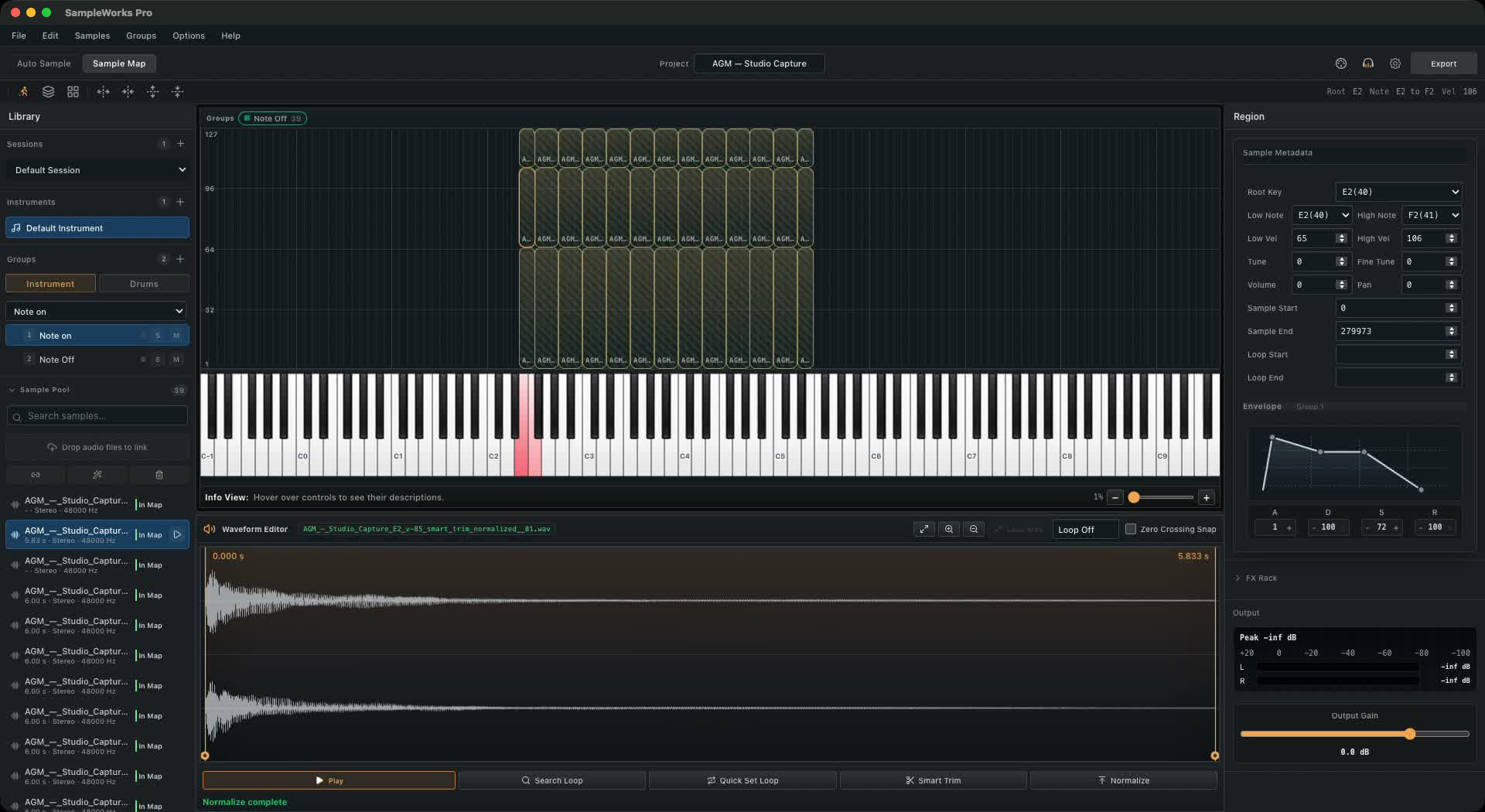
Plug-in captures, live recordings and imported WAVs all live in the Sample Pool, ready to map, edit or keep for later.
Auto Sampler places each note and dynamic on the keyboard. Refine ranges, layers and round robins in Sample Map.
Smart Trim, normalization and LoopSearch shape each sample. Processing creates new samples and leaves your originals untouched.
Yamaha Genos via Yamaha Expansion Manager. Korg Pa5X drum kits via TX16Wx.
One Place To Sample,
Shape And Map Your Sound.
Start with what you already play.
Choose the capture workflow for your source.
Choose a preset and a sampling plan. Auto Sampler captures VST3 instruments and Audio Units on macOS, note by note.
AUTO SAMPLERA microphone, a line input, an instrument you know. Record with a guided session, a click and a count-in.
LIVE RECORDINGSend MIDI to your synth or sound module. Capture its audio across the notes and dynamics you choose.
MIDI + AUDIOTHE PRODUCT FILM
See sampling, sound shaping and mapping
come together in SampleWorks Pro.
Set the response. Refine the sustain.
Keep the original character, or create a new one.
Map each sample to its notes and dynamics. Build soft and hard layers, add round robins, and adjust the envelope to suit your playing.
Trim silence, add fades and normalize levels. Preview effects as you play, then choose whether to apply them to the exported audio.
LoopSearch uses a smart algorithm to analyze the sample and find a suitable sustain loop. Refine the loop points, crossfade and playback direction in the editor.
DRUMS MODE
Bring together your own kicks, snares and percussion. Build the dynamics and variation that make the kit feel right.
Prepare personal voices and drum kits
for the setup you take on stage.
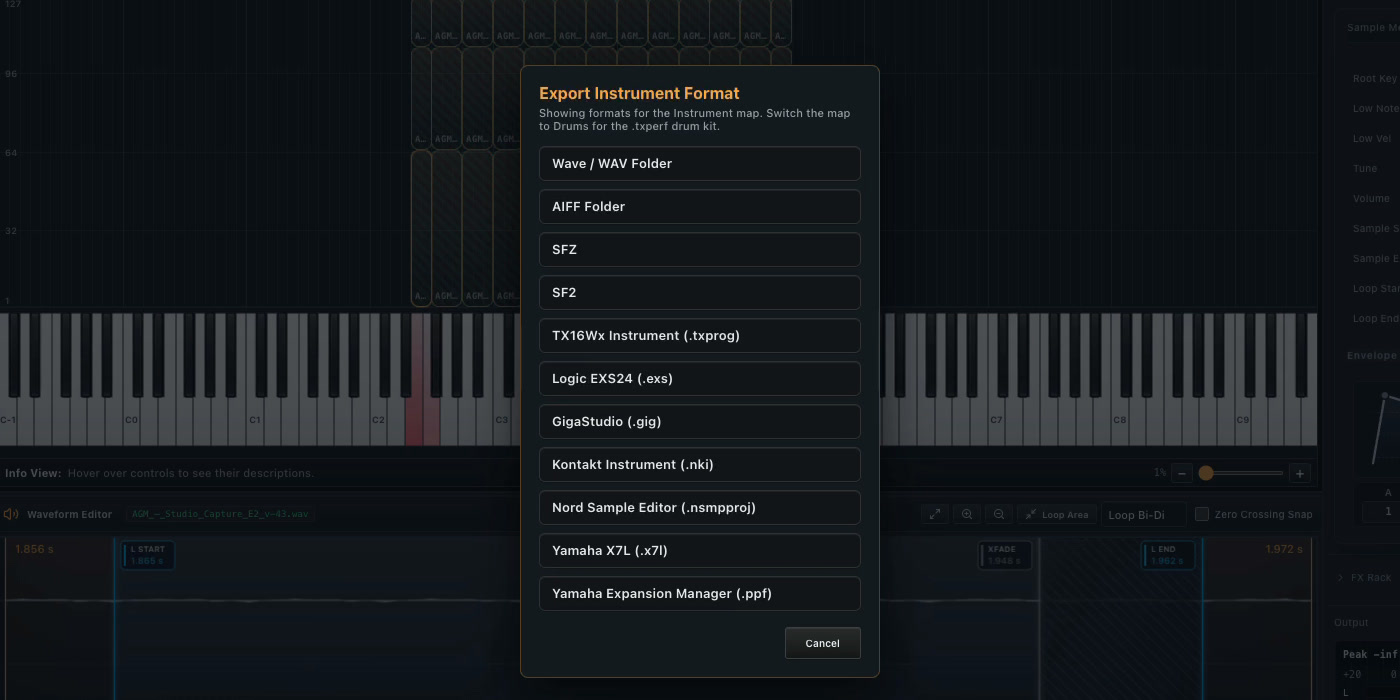
VOICES & DRUM KITS
Export a .ppf pack for Yamaha Expansion Manager, then install it on Genos through Yamaha’s workflow.
.ppf → Expansion Manager → Yamaha KeyboardsVOICES & DRUM KITS
Create sampled voices and layered drum kits for Korg Pa5X. Shape your instruments with velocity layers, and build drum kits with round robins and choke groups.
Drum Kits: .txperf + Samples → Pa5X ImportDOWNLOAD · VERSION 2.0.0
The demo does everything except export. Sample, map, edit and play as much as you like. A license unlocks export.
Not sure which Mac you have? Apple menu → About This Mac. “Chip: Apple M…” means Apple Silicon; “Processor: Intel” means Intel.
macOS: open the .dmg and drag SampleWorks Pro to Applications. On first launch, if macOS asks for confirmation, open System Settings → Privacy & Security and click Open Anyway.
Windows: run the installer. If Windows shows “Windows protected your PC”, click More info, then Run anyway.
SAMPLEWORKS PRO
A workspace for the instruments you want to create —
from the first recording to the final mapping.
$180 USD
Continue to UPAY to complete your payment.
Open Payment QR CodeGOOD TO KNOW
Producers, sound designers and musicians who want to build sampled instruments from their recordings, virtual instruments or hardware.
VST3 instruments, plus Audio Units on macOS. Compatibility depends on the plug-in and its architecture. VST2 hosting is not supported.
Yes. Send MIDI to an external instrument and record its audio output. A suitable MIDI connection and audio input are required.
Yes. Create sampled voices with velocity layers, or build layered drum kits. For drum kits, use Drums mode to build one group per drum, with velocity layers, round robins and choke groups. Export TX16Wx Drum Kit (.txperf), and keep the program, matrices and Samples folder together for the Pa5X import.
Export a Yamaha Expansion Manager (.ppf) pack. Add it to your pack in Yamaha Expansion Manager, then install it on Genos through Yamaha’s workflow. Follow the source-pack and target requirements shown by the exporter.
This is a workspace for creating instruments; sound libraries are not included. Use your own material or material you are licensed to use.
The FX Rack previews your processing as you play. Choose Apply on export to carry the effects into the exported audio. Your source samples stay unchanged.
Sampling, editing, analysis and export run locally on your computer. Licensing and update requests do not upload audio or projects.
Yes. SampleWorks Pro runs on Windows and macOS. Use VST3 instruments on either platform. Audio Units are available on macOS only.
A SampleWorks Pro license is $180 USD. Buy SampleWorks Pro on UPAY , or open the payment QR code to scan from another device. Payment opens in a new tab.
All purchases are final. We do not offer refunds, except where required by applicable law. Before purchasing, please review the features and confirm compatibility with your computer, plug-ins and intended export workflow.
SampleWorks Pro is an independent software product. It is not affiliated with, sponsored, endorsed or supported by the manufacturers of the plug-ins, instruments, sound libraries, keyboards or samplers referenced on this website. Product names and trademarks belong to their respective owners and are used solely for identification, illustration and compatibility information.
We respect copyright and intellectual property rights and expect our users to do the same. Users are responsible for obtaining all rights and permissions required to sample, record, edit and use source material, and to distribute or sell resulting content where permitted by applicable law and the rights holders’ license terms.
Purchasing or using SampleWorks Pro does not grant rights to third-party content or override any applicable restrictions. A product’s appearance on this website or in a demonstration does not constitute permission to copy or redistribute its sounds.